
I’ve tested a lot of no-code EA builders over the years. The biggest lesson is that “no code” can mean two completely different things: some tools convert your trading rules into an Expert Advisor, while others search through thousands of rule combinations and bring strategy candidates to you.
That difference matters more than a long feature list. If you already know that you want to buy after an RSI crossover and close at a specific time, a visual EA builder is usually the sensible choice. If you want software to discover and stress-test ideas, you need a strategy-generation platform instead.
My pick for most traders is EA Builder Pro because it puts visual building, AI assistance, cloud backtesting and MT4/MT5 export in one browser-based workflow. It isn’t automatically the best choice for everyone, though. These are the six EA builders I would shortlist, followed by the important differences between them.
1. EA Builder Pro — Best EA Builder for Most MT4 and MT5 Traders
EA Builder Pro is the easiest recommendation here for someone who already has a trading idea and wants to automate it without juggling several programs. It is web-based, supports both MT4 and MT5, and lets you build entries, exits, sessions, stop-loss rules, take-profit rules and money management through a visual interface.
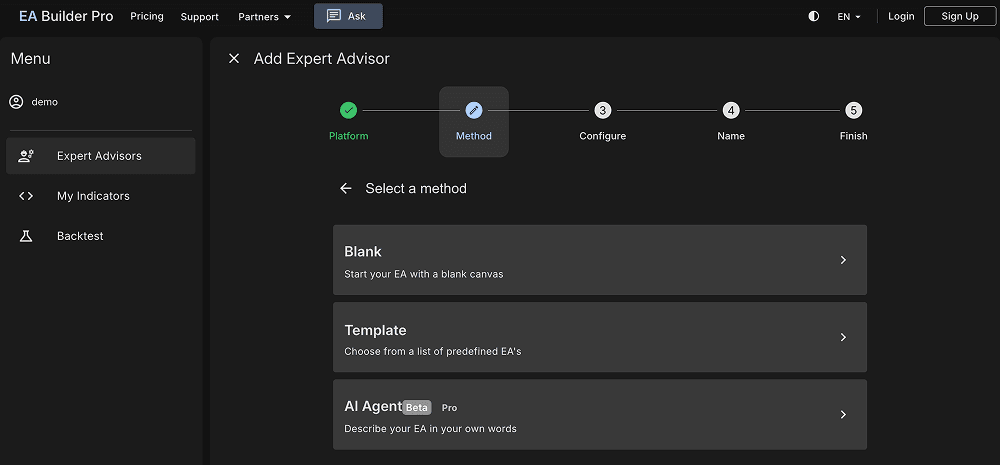
The useful part is how much of the workflow sits in one place. You can use standard indicators, import custom MetaTrader indicators, ask its AI Agent to create a starting version, adjust the rules yourself, run a cloud backtest and export the EA. The output choices include editable MQL4/MQL5 source and compiled EX4/EX5 files, although source export and higher limits depend on the plan.
I see the AI as a shortcut into the builder, not a substitute for understanding the rules. If the prompt is vague, the resulting EA can be perfectly valid code and still represent a poor trading idea. Open every condition, check what the agent actually built and make sure the order-management logic matches what you intended.
The free plan is unusually useful: you can create EAs, run a limited number of cloud backtests and export compiled files. Paid Pro access raises the limits and unlocks the fuller workflow. The public pricing page offers monthly and yearly choices, but its current amount is dynamically rendered, so check the live checkout rather than relying on an old price quoted in a review.
Choose it if: you want a modern no-code EA builder that covers the path from a plain-language or rule-based idea to an exportable MT4/MT5 EA. Look elsewhere if your main goal is automatically mining a large strategy universe rather than expressing rules you already understand.
- Combines visual rule building, an AI Agent, cloud backtesting and MT4/MT5 export in one browser-based workflow.
- Accepts standard and custom MetaTrader indicators.
- Free plan is useful for trying the builder before paying.
- Can export editable MQL source on the appropriate paid plan.
- Important limits and source-code export depend on the plan.
- Cloud backtests still need confirmation in MetaTrader and on a demo account.
- Less suitable than a research platform for automatically searching thousands of unrelated strategy ideas.
2. fxDreema — Best Visual EA Builder for Complex Trade Logic
fxDreema has been around since 2011, and its block-based approach is still one of the most flexible ways to map detailed MetaTrader logic without writing MQL by hand. You connect blocks for events, conditions and actions, then follow the path to see what the EA should do.
That visual flow works especially well for trade management. Break-even logic, trailing stops, risk-based position sizing, timers, order loops, chart objects and notifications can all be represented as blocks. fxDreema exports `.mq4`, `.ex4`, `.mq5` and `.ex5`, so you can keep source code or use a compiled file.
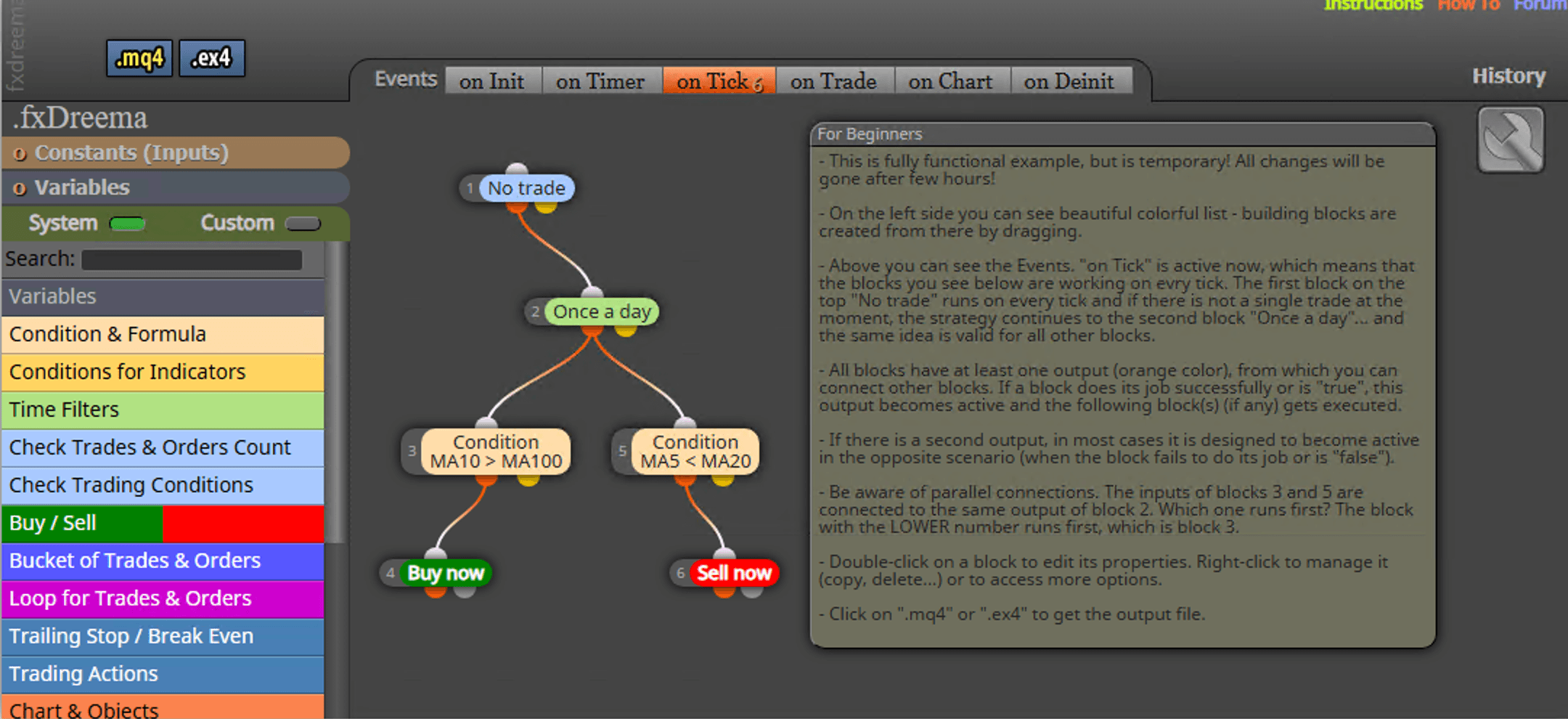
Its strength can also become its weakness. A small project is easy to read. A large project with branches everywhere can turn into a plate of spaghetti unless you name things carefully and split the logic into sensible sections. It also does not build custom indicators; it uses indicators as inputs to an EA.
There is no integrated research engine that makes a strategy safe. You export the robot and test it in MetaTrader’s Strategy Tester, then on a demo account. fxDreema’s own purchase page makes the same point. The free tier can export small projects, while Full access raises the block, connection and project limits. Paid access is sold for selected periods as one-time payments rather than an automatically renewing subscription; the numeric amounts are displayed dynamically, so confirm them on the purchase screen.
Choose it if: you think naturally in flowcharts and need more control over execution and position management than a basic form-based expert advisor builder gives you.
- Flexible visual block system for detailed MT4 and MT5 trade-management logic.
- Exports both source and compiled MetaTrader files.
- Free tier is enough to build and export small projects.
- Web and offline Windows versions are available.
- Large block diagrams can become difficult to follow.
- It does not build custom indicators.
- Testing is handled in MetaTrader rather than an integrated research engine.
3. EA Builder — Best Simple Builder with Lifetime Access
EA Builder by eabuilder.com is the old-school option in this list. The interface is browser-based and straightforward: define indicator conditions, trading times, entries, exits and money-management rules, then generate code for MetaTrader 4, MetaTrader 5 or TradeStation.
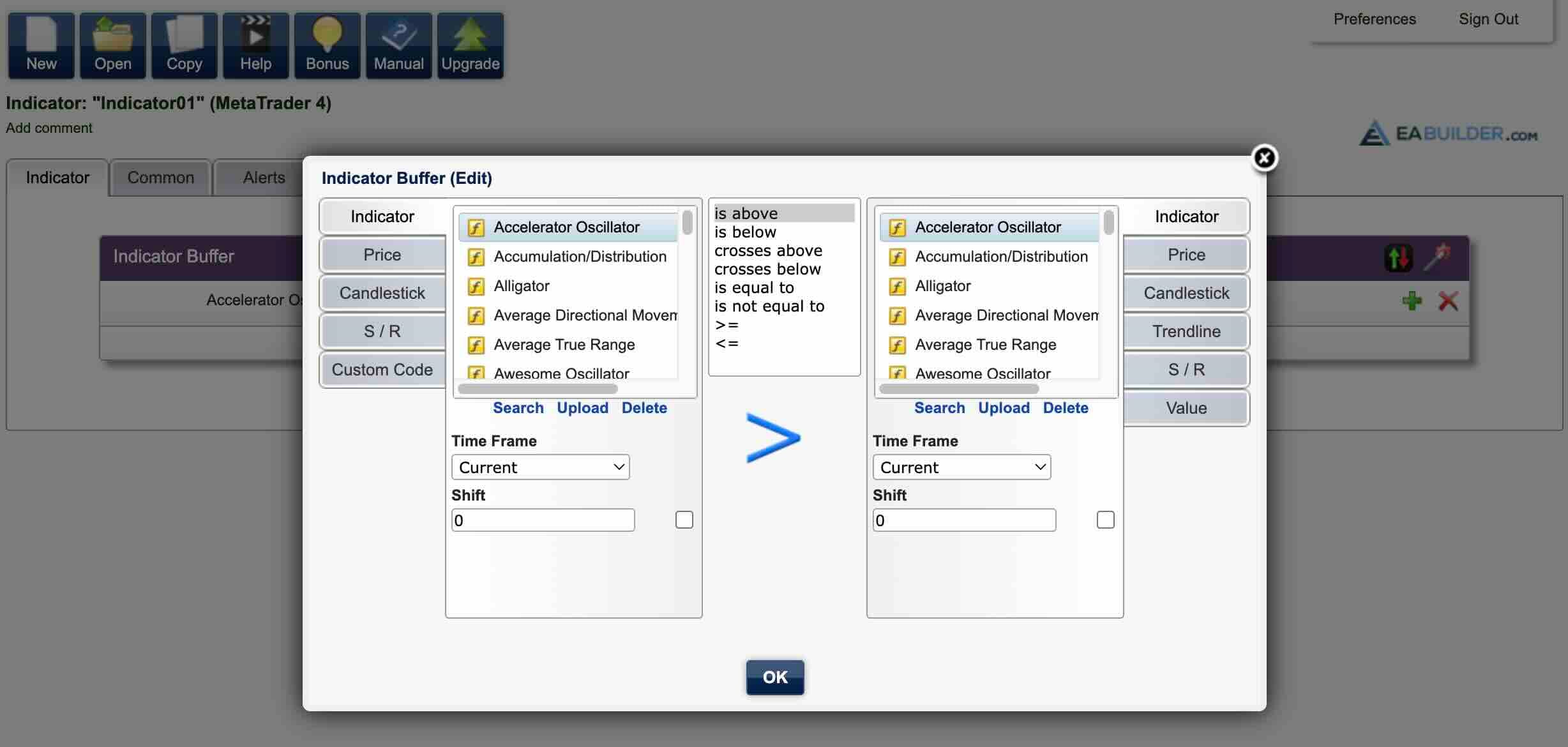
Its free account is mainly an indicator builder. You can create indicator arrows and alerts for MT4/MT5, or analysis tools for TradeStation, without paying. Creating automated strategies and Expert Advisors requires the Unlimited upgrade. The current official page lists that upgrade at a one-time $97 for lifetime access.
The output is a readable, commented single file. That matters if you want to inspect the logic, learn from it or hand it to a programmer later. The tool also accepts custom indicators and functions, which extends it beyond the built-in selection.
What you do not get is a serious built-in strategy-research lab. The site provides tutorials on backtesting and optimization, but validation happens in MetaTrader or TradeStation after export. It is also not an AI EA builder. That simplicity is either the appeal or the limitation, depending on what you expect.
Choose it if: you want to convert fairly clear indicator rules into readable code and prefer a modest one-time purchase over a recurring plan.
- Straightforward browser interface with no installation required.
- Free access can create indicators for MT4, MT5 and TradeStation.
- Paid access uses a one-time lifetime price rather than a recurring subscription.
- Generated code is readable and supplied in a single file.
- The free plan does not create Expert Advisors.
- It is primarily a rule translator, not an automated strategy-discovery platform.
- Validation and optimization rely on the destination trading platform.
4. Expert Advisor Studio — Best for Fast Automated Strategy Generation
Expert Advisor Studio belongs in a different category from the first three products. Instead of waiting for you to specify every condition, its Generator combines rules and tests strategy candidates against acceptance criteria. Its Strategy Reactor can continue generating, optimizing and validating candidates as a workflow.
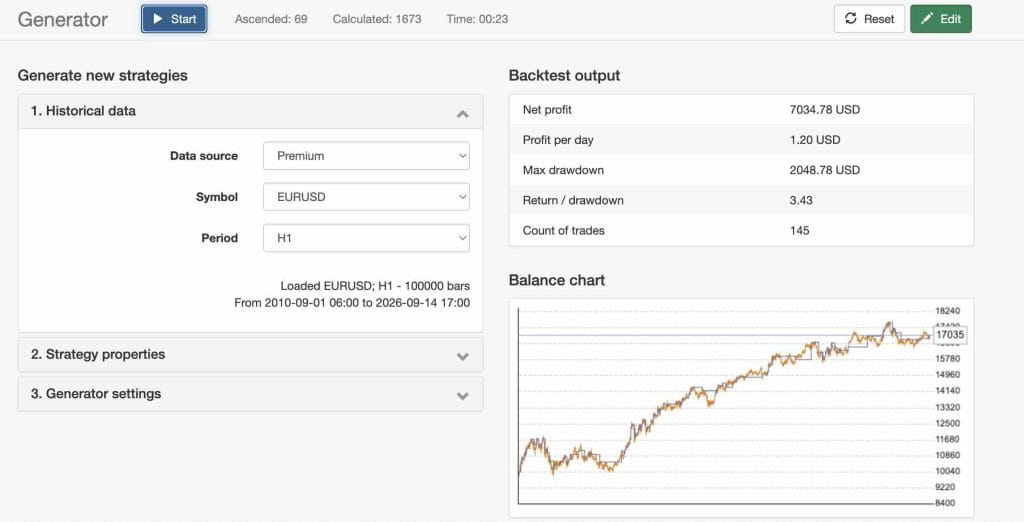
The platform runs in a browser and uses bar-open logic for fast backtests. It also provides Monte Carlo testing, multi-market validation, optimization and portfolio collection tools. Finished strategies export as native MQL4 or MQL5 source without external libraries. This makes it attractive when you want ideas from the software but still want portable MetaTrader code at the end.
The boundary is important: this is not the first tool I would choose to reproduce a discretionary setup with complicated intrabar decisions. Its speed comes from a defined strategy framework and bar-open model. A fast internal result should be checked with the same broker data and assumptions in MetaTrader, then forward-tested on demo. The vendor itself recommends testing exported EAs with another broker before live use.
The public product page currently advertises access “from €190,” while the main pricing page lists a €1,490 lifetime license within its software offers. Those may represent different access arrangements. Confirm exactly what is included and what you can export before paying.
Choose it if: you want an efficient, browser-based generator for conventional MetaTrader strategies and prefer software that supplies candidates rather than only translating an existing rule sheet.
- Automatically generates and backtests large numbers of strategy candidates.
- Includes Monte Carlo and multi-market validation tools.
- Browser-based workflow does not require coding.
- Exports native MQL4/MQL5 source without external dependencies.
- Better for generated bar-based systems than for reproducing highly custom discretionary logic.
- Public pricing pages present several access options, so the exact checkout needs checking.
- Its fast internal backtest should still be reconciled with MetaTrader and demo execution.
5. Build Alpha — Best for Robustness Testing and Multi-Market Research
Build Alpha is closer to a quantitative research workbench than a conventional MT5 EA builder. You choose markets, data, signals, constraints and performance requirements; its genetic algorithm searches for combinations, then you filter and stress-test the results. It also now has an AI assistant layer: you can connect an LLM to help configure the research loop, propose inputs and iterate on results rather than treating the genetic search as the whole workflow.
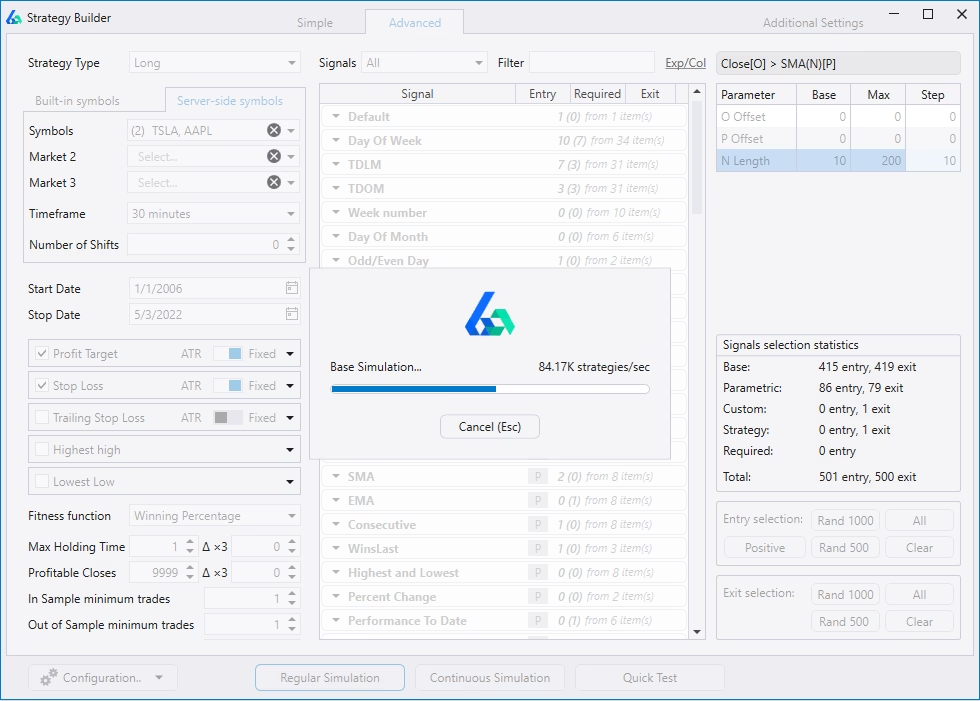
The current MetaTrader edition advertises more than 7,000 signals, over 12 robustness tests, portfolio construction and export to MT4, MT5 and several other platforms. It can also use non-price inputs such as breadth, economic data, yields and sentiment. Optional AI-model integration can help direct a search, but the model does not replace the testing pipeline.
This is the sort of tool that makes sense if you want to compare ideas across markets or build a portfolio of systems. It is excessive if all you need is “buy when these two indicators cross.” More search power also creates more chances to find a historical accident, so the robustness tools and out-of-sample discipline are not optional extras.
Build Alpha’s current licensing page lists a $1,497 one-time lifetime license with upgrades included, and it does not offer a free trial. The vendor provides videos and states that included data goes back to 2006, but I would watch the workflow demonstrations closely before buying at that price.
Choose it if: your priority is idea generation, validation and portfolio construction across more than MetaTrader—not simply drawing one EA in a visual editor.
- Strong strategy-generation, portfolio and robustness-testing workflow.
- Large signal library with both price and non-price data categories.
- Exports MQL4/MQL5 and code for several other trading platforms.
- Lifetime license includes future updates according to the current licensing page.
- Considerably more expensive than simple visual EA builders.
- No free trial is currently offered.
- The breadth of research controls creates a steeper learning curve.
6. StrategyQuant X — Best Advanced Expert Advisor Builder
StrategyQuant X is the deepest research platform in this comparison. Its Builder automatically searches for strategies, while AlgoWizard is the visual editor for rules you already know. You can then retest, improve and optimize candidates, run robustness checks and export unlocked source code for MT4, MT5, TradeStation, MultiCharts or JForex.
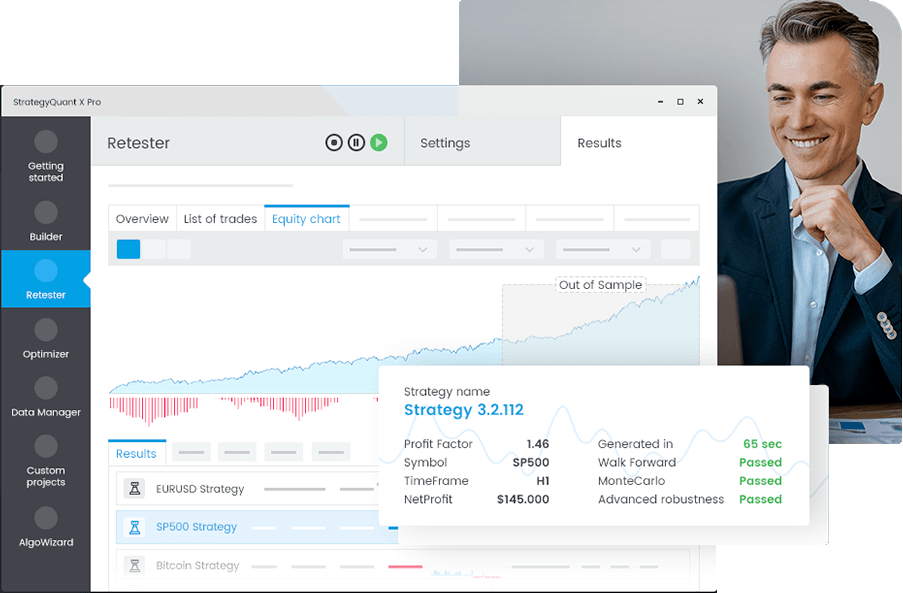
That two-lane workflow is one of its better ideas. You do not have to pretend strategy discovery and strategy implementation are the same task. There is also an AI Wizard in AlgoWizard: describe an idea in plain language, create or improve the strategy, then edit and backtest it. AI usage consumes credits included by license edition.
StrategyQuant X gives you plenty of ways to reject weak systems—Monte Carlo analysis, parameter permutations and walk-forward tools among them—but only if you configure the research honestly. Running a huge search and keeping the prettiest equity curve is still curve-fitting with nicer software.
The current one-time lifetime prices start at $1,290 for Starter, then rise to $1,490 for Professional and $2,900 for Ultimate, excluding VAT. Twelve-payment alternatives are available, and a 14-day trial gives you a chance to see whether the workflow and hardware demands suit you. Advanced robustness and custom workflow features begin above Starter, so compare editions rather than choosing on the entry price alone.
Choose it if: you want a full systematic-research environment and are willing to learn it. For a trader who only needs one simple EA, it is difficult to justify.
- Deep toolset for generation, retesting, optimization and robustness analysis.
- AlgoWizard handles known rules while Builder searches for new strategy candidates.
- Exports unlocked source code for MT4, MT5 and other supported platforms.
- A 14-day trial lets traders assess the workflow before buying.
- High purchase price compared with a basic no-code EA builder.
- Advanced robustness and portfolio features require higher editions.
- Serious strategy searches can demand substantial computing time and careful controls against overfitting.
Best EA Builder Comparison
The table below is the quick version. “Built-in testing” means the product has its own backtest or research environment. It does not mean you can skip MetaTrader testing or a demo run.
| EA builder | Best for | Approach | MetaTrader | Output | Built-in testing | Current pricing |
|---|---|---|---|---|---|---|
| EA Builder Pro | All-in-one rule building | Visual + AI assistant | MT4 & MT5 | MQL4/5 or EX4/5 | Cloud backtesting | Free; paid Pro plans;$19.99 per month |
| fxDreema | Complex visual logic | Block-based | MT4 & MT5 | MQ4/5 or EX4/5 | Use MetaTrader | Free; paid time passes; $30 per month |
| EA Builder | Simple rules and indicators | Form-based | MT4 & MT5 | Readable source code | Use target platform | Free indicators; $97 lifetime |
| Expert Advisor Studio | Automated EA generation | Strategy generator | MT4 & MT5 | Native MQL4/5 source | Backtest, Monte Carlo, multi-market | From €190; lifetime option shown |
| Build Alpha | Research and portfolios | Strategy generator + AI assistant | MT4 & MT5 | MQL4/5 + other platforms | Backtest + robustness suite | $1,497 lifetime |
| StrategyQuant X | Deep systematic research | Visual builder + generator | MT4 & MT5 | Unlocked source code | Backtest, optimize, robustness tests | From $1,290 lifetime |
No-Code EA Builder vs AI EA Builder vs Strategy Generator
These labels get mixed together in search results, but they describe different jobs.
- A visual no-code EA builder converts rules you define into executable code. EA Builder Pro, fxDreema and EA Builder mainly fit here.
- An AI EA builder accepts a plain-language description and turns it into a starting strategy or code structure. The quality still depends on how clearly the rules are defined and whether you inspect the result.
- A strategy generator searches many combinations to discover candidates. Expert Advisor Studio, Build Alpha and StrategyQuant X lean into this job, with different levels of research depth.
If you already have a tested manual setup, start with a rule builder. Otherwise you may pay for a large research engine only to recreate three conditions you could have drawn in an afternoon. If your problem is that you have no quantified strategy yet, a basic builder cannot invent evidence for you. That is where a generator and its validation tools earn their place.
How to Choose the Best Expert Advisor Builder for Your Workflow
I would choose from the end of the process backwards. Decide what you need to own, how you will test it and how much control you need after export.
- Write the strategy in plain rules. If you cannot define the entry, exit, sizing and session logic without words such as “strong” or “looks good,” the builder cannot define them for you.
- Choose between translation and discovery. Use a visual builder for known rules. Use a generator when you need to search for candidates.
- Check the exact output. Editable MQL source gives you more control than a compiled EX file. Confirm whether source export requires a higher plan.
- Match the testing model to the strategy. A bar-open tester is fine for strategies designed around bar-open decisions. It cannot prove intrabar scalping behavior.
- Price the complete workflow. Include data, AI credits, updates, additional modules and any higher tier required for robustness tests—not just the headline license.
- Confirm portability. Check whether exported code has external dependencies, whether you can edit it and whether it continues to run after your plan ends.
How to Test an EA Before Using It on a Live Account
An EA that compiles is not an EA that works, and a backtest that makes money is not proof of a durable edge. Before I trust an automated strategy, I want the logic and the execution checked separately.
- Read every generated rule. Verify entries, exits, stop behavior, position sizing, trading hours and what happens after an error or restart.
- Compile with zero unexplained errors. Warnings deserve investigation too, especially around types, prices and order handling.
- Retest in MetaTrader. Use the intended broker’s symbol settings, spread, commission, swaps and realistic execution assumptions.
- Separate development and validation data. Keep an out-of-sample period that was not used to choose rules or parameters.
- Stress the assumptions. Vary spreads, slippage, starting dates and key parameters. A strategy that survives only one perfect setup is fragile.
- Check enough trades. A smooth curve built from a tiny sample tells you very little.
- Forward-test on demo. Confirm that signals, order sizes and trade management behave as expected in real time.
- Start live at the smallest practical risk. Monitor differences between the expected and actual fills before increasing exposure.
Check out nano size brokers for live test.
No builder can guarantee profitability. It can remove coding friction and make testing faster; it cannot remove market changes, bad assumptions or execution risk.
How I Compared These EA Builders
I started with the practical split I have seen while testing no-code builders over the years: tools for implementing a known idea versus tools for discovering new ones. I then checked each vendor’s current public product, documentation and pricing pages.
The comparison focuses on MT4/MT5 support, how rules are created, whether AI changes the workflow, source-code ownership, testing boundaries and the real route from a project to a running EA. Prices are included only where the current official page exposes them clearly. Vendor statistics and speed claims are not treated as independent performance results.
This is a product and workflow comparison, not a claim that every generated strategy was traded under controlled live conditions. Plans and features change, so verify the checkout and export rights before buying.
My Final Pick
EA Builder Pro is the best EA builder for most MT4 and MT5 traders because it combines an approachable rule builder, AI assistance, cloud backtesting and flexible MetaTrader exports. fxDreema is my alternative when the execution flow is complicated and I want to see it as connected blocks.
If the job is strategy discovery rather than implementation, I would skip the basic builders. Expert Advisor Studio offers the quickest route into automated generation, while Build Alpha and StrategyQuant X make more sense for serious research and robustness work. Between those last two, the decision comes down to which workflow you understand well enough to use without turning a large search space into an overfitting machine.
FAQ
EA Builder Pro is the best MT5 EA builder for most traders who already know their rules. It offers a visual workflow, AI assistance, cloud backtesting and MQL5 or EX5 export. For automatic strategy discovery and deeper robustness research, StrategyQuant X is more capable but substantially more expensive and complex.
Yes. Every product in this comparison can create an MT4 or MT5 Expert Advisor without requiring you to write MQL manually. You still need precise trading rules and enough knowledge to verify the generated logic, test it and manage risk.
EA Builder Pro has a free plan that can create and export EAs within limits. fxDreema can also build and export small projects for free. The free version of EA Builder by eabuilder.com creates indicators, but automated strategies require its paid lifetime upgrade.
AI can translate a clear idea, suggest rules or help steer a strategy search. It cannot prove that an EA will remain profitable. The result still needs logic review, realistic backtesting, out-of-sample checks, stress testing and forward testing.
Choose MQL4 or MQL5 source when possible. It lets you inspect, edit and recompile the EA later. EX4 and EX5 files are convenient when you only want to run the strategy, but they give you less control and are harder to audit.
An EA builder normally converts rules you provide into code. An EA generator searches combinations of indicators, entries and exits to find strategy candidates. Some platforms now include both workflows, but you should decide whether you are implementing an idea or searching for one before choosing a tool.
Yes. Even when a builder includes cloud or internal backtesting, retest the exported EA in MetaTrader with the broker, symbol settings, costs and execution assumptions you plan to use. Follow that with a demo forward test before risking money.